
Being big WordPress fans, we are naturally excited over new releases – even if it means additional upgrade work. With every release there’s always something good in it and granted, this release is OK, there’s not like a ton of new things like some in the past. Still, we are uber-excited over one feature in particular.
Internal Linking
We’ve been waiting for so long and even started writing a plugin on it. Now, we don’t have to. With Internal Linking you can quickly find and link to an old post you have written directly from the post screen without having to open a new tab in your browser, do a search, copy and paste. It may be easy to miss though. Here’s how you find it.
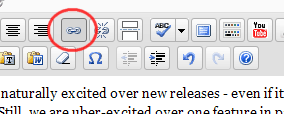
Highlight the text you want to create a link from. The link buttons will be activated. Click it.
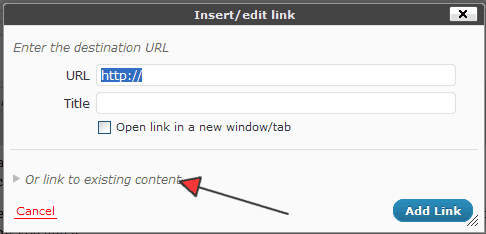
You will see the normal window to enter the URL you want to link to. You may have to click the “Or link to existing content” link at the bottom to expand the window.
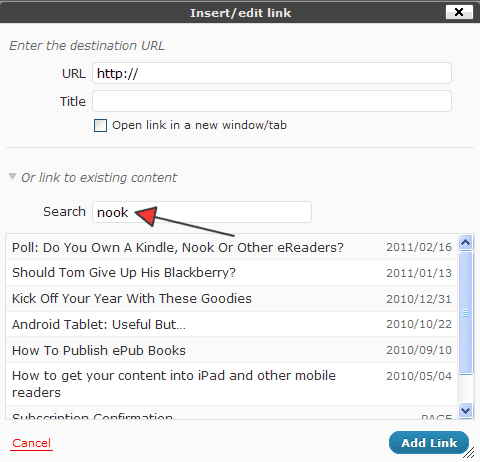
Now you will see a list of all your old posts you can scroll to find or if it is a really old post and you have a lot to go through simply search. WordPress will search as you type in your search phrase.
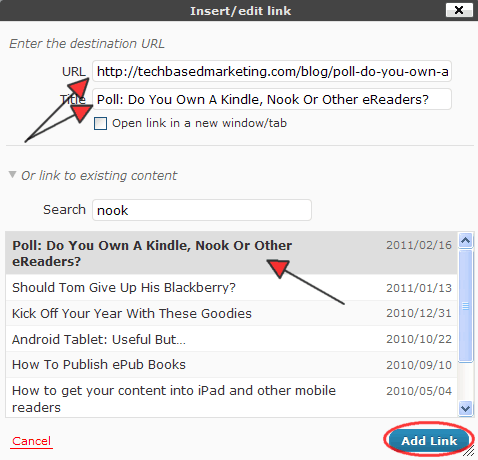
Once found, simply click on the post you want to link to. The URL and title of the post will automatically be added to the fields above. Click Add Link and you’re ready to roll.
It seems like such a simple, trivial feature doesn’t it? But good things often come in small packages this one is definitely one of them. Anything to help us shave off time here and there we love. The only thing we wished where different, it only displays published posts so if you are blogging ahead and have posts scheduled, they won’t show up. We’ll be looking for a solution on this for sure.
Unsure about the Admin Bar
The most visible new feature is probably the Admin Bar. You won’t see it in the admin if when you have a single blog. But you will see it when visiting the public portion of your site.
On one hand, I like the ability to quickly jump to a few key admin screens. I’m not entirely sure I’m wild about having it on membership sites. I suppose it depends how your membership site is set up. It could be great for your members. But it could also be a hindrance if you want to control their experience. I imagine we’d see a lot of requests to have the capability to tweak or remove it altogether. I actually have an idea what to tweak/add here.
If you want to remove the admin bar altogether, add this to your theme’s functions.php file before the closing ?> tag
show_admin_bar('0');
You can also tweak the Admin Bar to add links like this. Add it to your theme’s functions.php file before the closing ?> tag
// Admin Bar
function my_admin_bar_render() {
	global $wp_admin_bar;
	$wp_admin_bar->add_menu( array(
        'id' => 'my_membership',
        'title' => __('My Membership'),
        'href' => 'http://yahoo.com'
    ) );
  $wp_admin_bar->add_menu( array(
        'parent' => 'my_membership',
        'title' => __('Subscriptions'),
        'href' => 'http://google.com'
    ) );
}
// and we hook our function via
add_action( 'wp_before_admin_bar_render', 'my_admin_bar_render' );
Thanks to WP Snippets for the inspiration.
Post Formats
This is also new in 3.1. More interest to a theme developer but as a regular user it might be good to be aware of it so you can ask your resident techie. In short, you can customize the way a post is to be displayed. It is not exactly as drastic as different theme for different posts but it allows a theme to help you organize your content visually. Asides, Galleries, regular posts, audios, images, posts, videos – their design can be tweaked by calling on the type of post format. If you have no idea what I’m talking about don’t worry about it 🙂 your theme has to support it and if you have a good theme developer, they should give you great instructions how to use it.
There are many more small but good edits in the back end especially for theme and plugin developers. I’m excited to check them out. On the user side, these, especially internal linking has our thumbs up.
