• Home
  • About
  • Contact
Marketing Technology Help
  • Products
  • Video Tutorials
  • Downloads
  • Blog
  • Contribute

2 Gorgeous Yet Functional Plugins For Timelines And Processes

By Lynette · Comments (2)
Friday, January 13th, 2012
Plugin preview

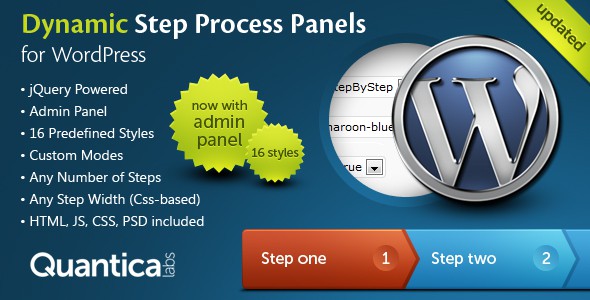
I’m working on a new way to present and display our checklists, lessons and guides in TechBasedTraining. Because a lot of these things are done in a step-by-step manner, I thought it would be good to display them as a process and started build it using some simple jQuery. This was my result Fortunately, while poking around at CodeCanyon one day I stumbled on this great plugin that does this very thing in a much more attractive manner – not to mention less coding for me. Take a look at Dynamic Step Process Panels. I think you’ll agree with me it’s such a nice looking and useful plugin to guide people through the steps they need to complete. They also have a non-WordPress version. While in CodeCanyon, I also found this other impressive plugin called Timetable for WordPress. I’m thinking it might look great for schools, community sites, theaters or even a gated community to display webinar schedules.

Comments (2)

Free Plugin: Pretty CSS Tables For WordPress

By Lynette
Thursday, March 31st, 2011
Screenshot of table styles

Do I have a goodie for you! During an Ask Armand session (part of AM2), Armand Morin was answering a question regarding tables in WordPress. What happened was, this person had created a table in Dreamweaver with styles they wanted then pasted the table into WordPress. Of course the results were not as expected. Those of us who are familiar with WordPress and in general web building completely understand the reason why. One thing Armand said struck me. That tables in WordPress are not always straightforward. He’s right but it need not be so at all. In our CSS Quickstart training, I recorded a small demo for students how the CSS hierarchy works and I thought, well this would be the ultimate demonstration. So I created a stylesheet just for tables and made it into a plugin. You install the plugin and with some very minor modifications to your table will now use these pretty styles instead of whatever the theme designer has set. This Pretty CSS Tables plugin pack includes 4 styles and you can download the plugin here More thoughts: Although the plugin is nice and convenient, it actually works out best if you could create the styles

Read More→

List Authors Plus Plugin

By Lynette
Friday, October 17th, 2008

Wow, I was so caught up with security that I totally forgot to tell y’all about my new plugin. Well, I told ya this was coming out a week ago and here it is. This plugin was created after I got tired of patching together bits and pieces of coding and couldn’t make things work properly. Also in response to some client requests. List Authors Plus lets you list authors on your blog as well as filter out authors by role, individual ID or name. It’ll also organize the authors by most posts if you wish. Why not use wp_list_authors tag? Because that tag (at this time) is limited. It can only filter out admin but not selective roles or people. That is the biggest thing. Sorting is also not possible. Maybe WordPress will add them in the future but for right now if you need to do this, use our plugin. This is the official page for the plugin. This is the download page for it over at WordPress Plugin Database. Enjoy!

New Plugin Heads Up

By Lynette
Monday, October 6th, 2008

I’m finally releasing a WP plugin. Been wanting to do this forever, got caught up with other things at least one is finally here. This will probably not be my last but I think it’ll be a while yet till the next one comes along or maybe not. I have so many ideas. Anyway, I’m still working out the listing and all that jazz. Should let you know in a day or two where you can download it. This plugin is more an admin plugin. Simple, but through my experience something that blog owners have been looking for that is to extend the existing wp_list_authors template tag. The current tag is still not very developed. You can list authors and remove admins but that’s about it. The plugin will allow you to have finer control over who to display and more importantly allow you to display ‘top authors’. Watch this space.

Get a 12 page report packed with 180 Free Tools You Can Use To Build Your Business when you sign up for the Tech Based Marketing Memo.

You will also receive regular tips, suggestions, special offers and answers to your technical issues. All you need to do is enter your name and email address below


Topics

  • Answers
  • Beyond Business
  • Blog
  • Blogging For Business
  • Coupons and discounts
  • Cutting Edge
  • Downloads
  • Email Marketing
  • Plugins
  • podcast
  • Tools
  • Tutorials
  • WordPress Themes

Popular

  • Evernote Tip: Getting Email Reminders
  • How To Get https On Your Domain
  • Creating A Separator Line
  • How To Build Tweet This Links
  • Ultimate WordPress Form Plugin

Follow Me Around The Web

  • Lynette's Twitter Stream  Follow me on Twitter
  • TechBasedMarketing on FB  Be a fan on FaceBook
TechBasedMarketing
Copyright © 2005 - 2012 All Rights Reserved
Affiliates
Disclosure | Privacy | Terms of Use